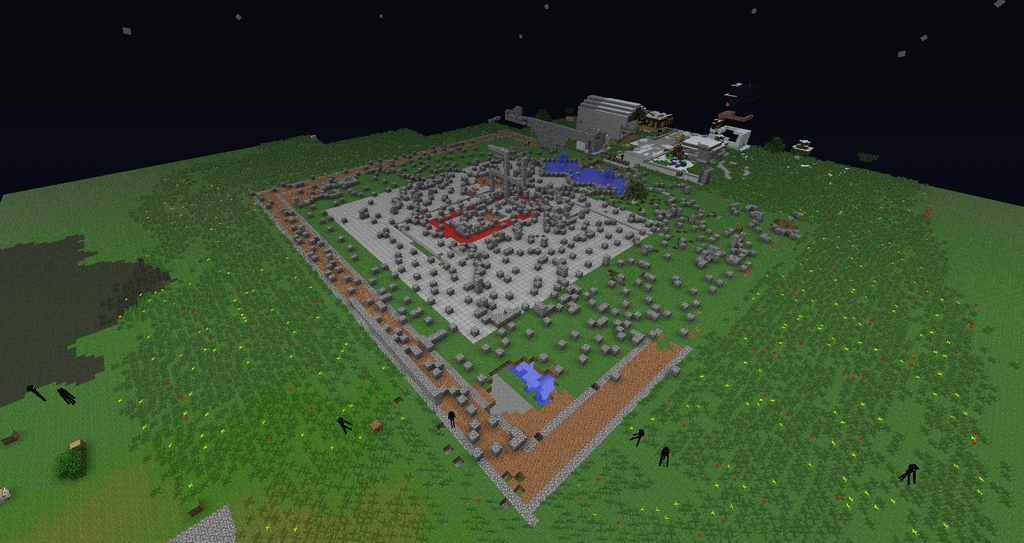

A destroyed castle with a swastika built on the remains.
Griefing is the act of irritating and angering people in video games through the use of destruction, construction, or social engineering. Popularized in Minecraft by teams, griefing has become a serious problem for server administrators who wish to foster building and protect builders. Most players tend to dislike and frown upon griefing, while others feel it adds a certain degree of drama to the game.
The purpose of this page is to instruct players on how to prevent griefing, whether you're just a normal player or a server administrator/owner.
Griefing methods and prevention
| Method | Description | How To Prevent (with Bukkit/Spigot and plugins) | How To Prevent (with unmodified Minecraft) |
|---|---|---|---|
| Destruction | Most griefers' goals are to destroy as much land, buildings and creations as they can in order to make the server as unusable as possible. This can include Creative "nuking", where users instantly mine all blocks within reach, and "torch nuking" when the griefer destroys only torches. Many hacked clients have these as built in features. A more time-consuming and generally expensive method of griefing is the creation of TNT cannons to bombard other players' creations from a safe distance. When it comes to destroying houses, griefers will often steal the player's most valuable items before destroying the house. A fast, and potentially more effective, method (if the server allows it) is spawning withers. End crystals are also effective, but more expensive and less practical to place. | This can be avoided with block and chunk protection plugins if you are using Bukkit. Logging and rollback plugins can completely undo the damage done by individual griefers. Restricting TNT will render cannons worthless. | You can use the following commands, either in a repeating command block, or a function to prevent TNT from being used.
kill @e[type=tnt]
kill @e[type=tnt_minecart]
If you are using Bedrock Edition, you can change the gamerule Other than that, frequently backing up your world and banning or kicking griefers is about all you can do. |
| Creation | Nearly as frequently as simple destruction of servers, griefers also often attempt to create nude or offensive pixel art. Also, cages around players that are AFK are built, often of materials unable to mine with tools obtained early on, like obsidian. Sometimes players even surround other players' structures with obsidian, bedrock, and sand or gravel which are annoying due to their falling properties. Lava casts are also a problem (see Lava/Water Flooding below). | If you have chosen to use Bukkit, logging and rollback plugins can once again completely undo the damage done by griefers. | Sand and gravel can be removed quite quickly using torches. Banning offensive players is a good way to discourage griefing. Also, admins can use fill commands to remove any inappropriate structures from griefers. |
| Chat Spam | Chat spam is simply typing and sending large amounts of messages in chat, often randomly. The result of this can be server lag, which usually makes chat spam more of an annoyance than vandalism. | Stopping chat spam is relatively easy with spam protection plugins, of which there are a variety on Bukkit. | Banning or kicking are the only options, although to lessen the impact you can tell players to only have chat on when they need it. |
| Abusive Mob Spawning | This form of griefing is spawning mobs to the point that the server lags. With enough lag, the map can become corrupted and unusable. If the spawned mobs are hostile, they can be especially destructive on PvP servers. Creepers, withers, blazes, endermen, ghasts, and the ender dragon are even more destructive, as they can move and destroy blocks.
Chicken spamming is one of the more common ways of making mob lag, as automatic chicken farms are relatively easy to create. Alternatively, making a huge gold farm can also lag the server. |
There are various plugins available to limit the number of mobs, making it harder to create lag. | Using /kill is the easiest way to clear up mob lag. Here are some example commands you can use. If you are having a problem with a specific type of mob or in a certain area, you could use a repeating command block or function to kill those mobs.
kill @e[type=chicken]
kill @e[type!=player,distance=..50]
kill @e[type=chicken,limit=25,distance=..50]
The first command will kill all chickens in the loaded world, the second all non-player entities within 50 blocks, and the third a maximum of 25 chickens within 50 blocks. Note that this will cause the mobs to drop loot, so you may have to run this several times to kill everything, especially with slimes. You can also use run the command /gamerule mobGriefing false to stop mobs such as creepers or endermen from modifying the terrain. |
| Lava/Water Flooding | If able, griefers often will attempt to place as much lava and/or water around a map in order to make it as ugly and dangerous as possible. Water and lava can also be used together to create large amounts of cobblestone, stone or obsidian (sometimes referred to as lava casts). Water or lava can impede players from rebuilding the ruins of their houses. | The best way to prevent this from happening is to simply limit who is able to place lava or water using a Bukkit plugin. If the damage has already been done, the best way to remove it is with world editing plugins. | You can use the following command, either in a repeating command block or a function, to make it impossible for griefers to obtain lava.
clear @a lava_bucket Otherwise, just remember to frequently back up your world. |
| Spawn Killing | On servers with PvP enabled, some players will take advantage of this to kill legitimate players as they spawn. The use of client modifications such as "Kill Aura" is frequently used to give the griefer a large advantage. End crystals are also very effective weapons against players, being able to swiftly or instantly kill a player in Protection IV armor. Some may even use a hack called "Crystal Aura" to make this attack even more deadly. | The most effective way of preventing this is to disable PvP in the spawn area with Bukkit plugins and provide multiple exits for newly spawned players to escape from (a single exit point is very predictable). | You can use the following commands, either in a repeating command block or a function, to give a player invincibility and teleport them to a random location away from spawn. You will want to use a chain command block with this if not using functions. Note that players could abuse this by intentionally traveling to spawn to gain invincibility, which is why the invincibility command is shown with a smaller radius.
effect give @a[distance=..15,x=100,y=120,z=100] resistance 15 255 true
spreadplayers 100 100 30 300 true @a[distance=..20,x=100,y=120,z=100]
The latter command works as such in Bedrock Edition: spreadplayers 100 100 30 300 @a[r=20,x=100,y=120,z=100] For |
| Tree Creation | For a long time, block logging plugins did not have the ability to roll back the growth of trees. Because of this, griefers would place saplings and use bonemeal (if available) to grow full trees in the locations where houses once stood, preventing rollbacks from easily undoing their damage. They would also place lots of TNT on a tree and firebomb it (if it has enough leaves) to create devastating explosions. | Previously, server admins would restrict the use of saplings and bonemeal with Bukkit permissions; however, that lead to problems for normal players. Luckily, Bukkit logging/rollback plugins are now able to track and undo player-grown trees. | If you aren't using plugins, then you don't need to worry about this as good old fashioned backups are not affected by trees. However, if you really want a vanilla solution, you can use /clear to restrict the possession of saplings and bonemeal. |
| Fire Destruction | Many builders use a lot of flammable materials, and if the server has fire spread enabled, a griefer armed with flint and steel can quickly cause a lot of damage. | Disable fire spread with world protection plugins if you have chosen to use Bukkit. One can also restrict the use of flint and steel/spawn eggs. | If you do /gamerule doFireTick false, fire won't spread. Alternatively, use a combination of the following commands, either in a repeating command block or a function.
clear @a flint_and_steel clear @a lava_bucket kill @e[type=fireball] kill @e[type=small_fireball] |
| Social Engineering | Social engineering is any technique used as an attempt to gain the trust of people by acting as a normal player or creating a situation where the legitimate players need to trust them.
A common trick that griefers use is pretending to be from popular Minecraft websites or clans and asking for OP status in order to "review" the server. This is not a typical form of destruction griefing; however, this is a strategy employed by many griefers to gain trust and cause rage, or it may be done to get OP status and cause great destruction. |
Be very careful who gets administrator tools and make sure that you know them well enough to trust them with power. | If the griefer deops all of your operators, you can use the server console to deop them and reinstate control. |
| Trolling | Trolls like to annoy players, rather than outright grief them.
There are several ways to troll, such as killing a person and having them watch you throw their items into lava, spamming, and promising to give them items, and doing so before killing them the moment they exit a safe zone. |
Most of these cannot be blocked, though they are usually easy to notice. A troll usually wants you to see what they have done, so they can annoy you more. A good temporary ban will solve things. A lot of trollers will stop after a firm warning, for example, "Stop trolling or I will ban you." This is often as effective as a ban. Usually, you only need to ban the person for a day or two. | |
| Map Corruption | A relatively rare form of griefing, map corrupting is simply making the map file as big as possible, usually by running as far as they can (and sometimes dominating the world with destructive mobs). This can lead to a lot of lag in the server, and can make the map size so big that it cannot be loaded. If a backup is not available, then the map may need to be deleted and all structures will be lost. This was a big issue before the Beta switch to a new chunk managing method. | Some Bukkit plugins can limit the size of a map, and some make automatic saves/backups of the file. | You can use /worldborder set [radius] to set up a world border that players cannot pass. By doing /worldborder set [radius] [time] it is possible to make it grow very slowly, making more space for legitimate builders. For example, do /worldborder set 1000000 1000000 to make the worldborder grow to a million blocks in radius over the course of a million seconds (or 1 block per second).
|
| Chunkbanning | Also a rare form of griefing, but quite destructive. The griefer uses a modded client to automatically write a large amount of information, either as NBT data or (more commonly) in Books and Quills using large Unicode letters, or on signs and placing the overloaded signs repeatedly in the same chunk. When a player picks up enough overloaded items and opens their inventory, or loads a chunk full of overloaded signs, they will be repeatedly kicked from the server over and over again, as every time they log on, they would re-load the overloaded inventory/chunk, causing them to send enough data in a packet to the server that it would force-kick them.
What's worse is that the griefer that built the overloaded chunk wouldn't be kicked; they place the signs gradually, which means the packets won't overload (that is unless they disconnect when there are enough signs and they're within the vicinity). |
Some plugins have a way to relieve the overloading by setting the data limit much higher than the vanilla data limit, however, loading the overloaded chunk would (as expected) still lag the server by quite a bit, and it's recommended for an operator to delete the overloaded chunk ASAP. | If you're traveling and get stuck near an overloaded chunk, try lowering the draw distance to 2 chunks. Most servers have a 4-8 chunk render distance, so lowering your client render distance can sometimes mean you won't load the overloaded chunk at all. At that point, travel the opposite direction for a couple hundred blocks, before you turn the draw distance back up again.
The only way to stop an overloaded inventory, ironically, is to use a hacked client yourself, which would allow you to connect, get your inventory, and throw out the modded data items without sending an overloaded packet to the server. Well, that or reporting to an operator and telling them to completely clear your inventory. |
| Combat Logging | Combat logging is mostly a problem on PvP servers. Combat logging is when you're in combat with someone and they log off while you're fighting them. It does not inflict harm, but like trolling, just annoys people and causes frustration. Sometimes PvP logging is the sign of a desperate player trying to stay alive or a connection error, though. | Some Bukkit plugins can "tag" people when they get hit whilst in combat, which will create a penalty if they log out. | It is possible to set up a detection system that uses the scoreboard to check the amount of health of the players before they leave. However, this is very complicated and would be hard to set up. |
| Lag Generation | Item drops, redstone, armor stands, lingering potions, fireworks, splash potions, minecarts and boats have a long history of causing strain on servers and clients. A griefer may attempt to lag out a certain area of the map by placing a lot of the aforementioned items into a small area or build "lag machines" with no purpose beyond generating lag, forcing both server and client to handle a lot of different things at once. This form of griefing is especially prevalent in creative servers, where obtaining these lag-inducing items is incredibly easy. | If you are using Bukkit, you can limit creation placement of certain blocks that have a tendency to cause lag, and research plugins that will remove item drops on a regular basis. | The only way to stop griefing using this method is to use /kill in command blocks or functions. |
| Illusion Griefing | A socialized form of griefing, where multiple people grief and then blame it on one of their alternate accounts to evade punishment. This screen of deception can get alternate accounts or even innocent players banned while letting the real griefers continue their rampage. This form of griefing is becoming more popular with the rise of 'cracked' servers and the ability to create many alternate accounts. | To prevent this, watch very closely if the stories of the suspected griefer and the blamer match. If they do, it's most likely you're dealing with an illusion grief attempt. Some Bukkit logging/rollback plugins (such as Core Protect inspector) can tell you who actually did it, and you will be able to treat them as you please. | Turn online-mode to true in server properties so as to prevent players from using fake accounts. You could turn invisible or go on spectator mode to watch and try to find out who is really griefing. |
| Disguises | Some griefers drink invisibility potions and disguise themselves as a named horse while creating lots of destruction, using things like underground land mines, negative-effect splash potions, and powerful weapons. | Bukkit plugins that name the player who hit/broke something can be useful, as well as invisibility-negating effects. If you are not an admin, then you can simply snowball the air around targets to see if there is an invisible/camouflaged player there. | Remove invisibility from all players using this command:
/effect clear @a minecraft:invisibility In Bedrock Edition: /effect @a minecraft:invisibility 0 |
| Name changing | Some griefers change their names if they are banned to join the server again. This can be a nuisance because they get to return to the server and troll again, and makes bans ineffectual. | Make sure online-mode is set to true in server.properties, so users can only connect using a purchased Minecraft account name. Minecraft automatically bans players based on a UUID that does not change with the name, so this shouldn't be a problem. If this does turn into a problem, perhaps by a player with multiple accounts, you can use ban-ip and ban the IP address instead of the username. Note that IP addresses sometimes change or are shared by legitimate players, so use this carefully. Many griefers of this type who use an alt account do not come up with a disguised name at the first time and will often times change their name to a different one. Name changing can be checked with NameMC[1].
| |
| Join bots | Join bots are used to join tens or hundreds of accounts ("bots") to a server at once, usually to lag or spam the server. There are multiple methods they can use, such as connecting and disconnecting rapidly, chat spamming, drop spamming (in Creative mode), and slot filling. They are often hard to ban due to the fact that they use many accounts and proxies. Proxies make every connection that the spammer makes to the server appear to come from a different PC, thus preventing IP bans. | Most Join bots can be combated with a good Bukkit (Reported Proxies) anti-spam plugin but can still allow console floods (in the form of join floods). | This probably won't be a problem unless you have a really popular server, in which case you will probably be using plugins anyway. A good way to help protect against this is to make sure online-mode is set to true, to prevent fake accounts being used. |
| Hacked trolling | This is one of the hardest forms of griefing, as well as the rarest. A griefer hacks the server and bans the owners, co-owners, ops, and anyone who can edit (so the people who can ban others can't get back on). Then, they deop everyone else and the hacker makes themselves the "new owner". Then, the hacker will troll normal players who join, or destroy parts of the server. | A plugin can be used to prevent some players from being banned. It is best if the plugin is coded by a trustworthy person like an admin. External plugins might have a feature for griefers to use that can allow a player to be banned again. | As the server console always has moderator rights, you can use this to regain control. Alternatively, you can directly edit the op lists, found in your servers folder. |
There are many other forms of griefing, many of them are variations of the ones listed above. Essentially, if moderators are attentive and the server is equipped with the necessary plugins, a server can be very secure from griefing and spamming.
Griefing clients

While modifications to Minecraft clients are fairly popular with legitimate mods, griefers also often employ client modifications to aid their efforts. Apart from the mods below, griefing clients often include an in-game GUI to display enabled mods, as well as things such as chat commands (".commands") and keybinds to easily turn hacks on and off.
Warning: It is not recommended to purchase paid hacked clients, as the people behind them can never be trusted (whether they are bad programmers, scammers, untrustworthy, etc.). Hacked clients also never last forever; various paid hacked clients have been discontinued. Thus, if you pay money for a hacked client, you'll only be getting some months of usage until the hacked client gets discontinued. It will be a huge risk and a waste of your time. Never use cracked paid clients, they can ruin your computer with malware.
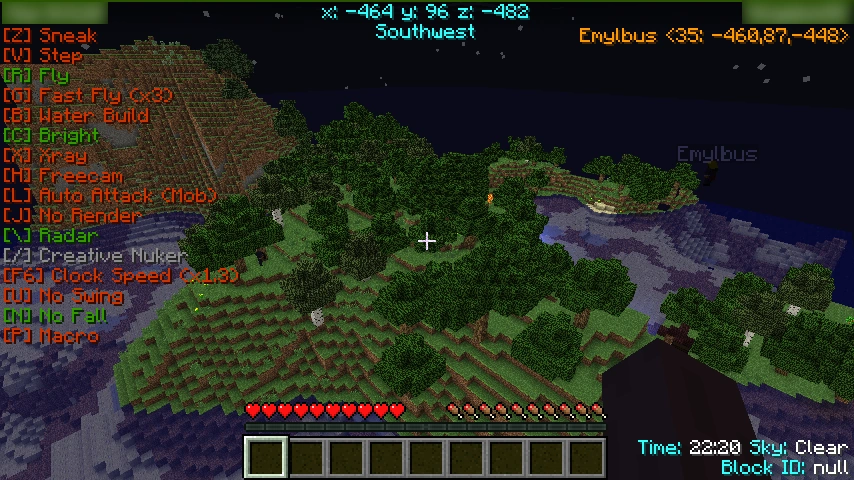

A hacked client, showing its in-game GUI.
- Crash: A hack that allows a player to teleport themselves to the World border and back by flying insanely fast between the Farlands and spawn. This usually crashes servers instantly and can only be combated with NoCheatPlus.
- Kill Aura/Forcefield/Aimbot: Kill auras, and similar mods called ForceFields, automatically attack any players or mobs within range of the player.
- Build: Build hacks are simply modifications that instantly place blocks in a predetermined pattern. Common builds include cubes, pillars, swastikas, and platforms.
- Critical: This hack is used to make sure you always hit a critical attack upon another player and/or mob. There's one which forces it without actually jumping, and one which jumps before attacking. Both are effective.
- ESP: This hack draws a 3D box around a player, which is viewable from a long distance and through blocks to locate them. In some cases, it also displays some info, such as the object in hand, armor, or coordinates.
- FastPlace: This modification eliminates the normal delay when placing blocks. This may also be applied to placing eggs in order to create a lot of entities in a short amount of time. Rebinding the use key to certain keys on the keyboard increases the click rate to 20[verify] clicks per second, making this feature possible in vanilla Minecraft.
- Throw or Egg: A hack similar to FastPlace. The difference is that while FastPlace very rapidly places blocks and throws entities, Throw is used to throw a lot of entities such as eggs or snowballs instantly. It can be used to lag the server.
- Flight or Fly: Not necessarily used just for griefing, this hack gives the user the ability to fly similar to as if they were in Creative mode, often at adjustable speed levels like in Spectator mode.
- Spider: This mod, similar to but less obvious as flight, causes every block the player encounters to be treated as if it had vines, allowing access to areas not normally accessible, used for griefing and especially for PvP.
- Freecam: This mod allows the user to separate themselves from their body and fly around to scout out areas. Since infinite reach was patched, the user of this mod cannot affect any blocks outside their reach radius. However, this hack can be used to peek into obsidian bases, and open chests within the player's reach distance.
- Fullbright: This hack lights up all blocks as if they were in direct sunlight, even in pitch blackness. The addition of the "Night Vision" potion enables this feature to be obtainable in vanilla Minecraft, and it's possible by editing the gamma within the options.txt file (line 4, in-game called Brightness, ranging from 0.0 (moody) to 1.0 (bright)) to 12.0 or more.
- Godmode: This makes the user invincible, preventing them from being able to take damage. Almost all versions of this hack have been patched, but there are still some versions that exist.
- HighJump: This allows the player to jump higher than normal, often at an adjustable jump height.
- NoFall: This hack prevents damage from being taken when falling from high areas. This was implemented into vanilla in the form of
/gamerule fallDamage. - Nuker or Annihilator: This destroys all blocks within reach automatically and quickly. They are also often configurable, allowing the user to destroy only certain block types.
- Sneak: This allows griefers to sneak indefinitely, and without being slowed down. This will keep their nameplates hidden behind walls just as if they were holding the sneak button.
- Spam or Flood: This allows the client to send a large number of chat messages to the server, and often very quickly. This is partially patched in vanilla, with the "disconnect.spam" kick message if you send messages too fast. Copying and continuous pasting a message into the chat provides a similar effect, usually at slower speeds than mods.
- SpeedMine or FastBreak: This allows the user to break blocks much faster than normal. It does not usually work on blocks such as obsidian, however.
- Instant or OneClick: Similar to yet different from SpeedMine. Instant and OneClick both allow the user to click blocks once without holding their mouse down, and a short time after, the block will break as if they had clicked and held to break it. This makes it easier to destroy multiple blocks quickly.
- Step: This modification allows for the user to simply walk up multiple blocks as if they were slabs. The number of blocks is usually adjustable.
- Tracers: This hack draws a line, which starts at the crosshair and ends at another player's position. It is used to locate a player accurately.
- X-Ray or Wallhack: Stops the rendering of any block besides ores desirable to the griefer. This hack is often used to find chests or valuable minerals such as diamond. It can be partially prevented using Bukkit server plugins that disguise ores and chests that are not adjacent to transparent blocks. People, however, have made resource packs that only have ore block textures, bypassing cheat detectors.
- Sprint or Speed: This will make the player sprint at the normal sprint speed, or faster. Most of the time, this will not deplete hunger. Other speed hacks can make you run at several times normal speed, enabling you to travel huge distances in a short time.
- AutoSoup: This will automatically eat mushroom stew, which in turn heals typically 3 hearts of health. This modification is only useful on servers where mushroom stew heals health, typically Kit/Faction PVP servers. When this mod is used, the soup is usually taken from inside the inventory and when the bowls are empty, they get stacked inside the inventory.
- AutoTool: Upon the player clicking on a block, this hack will automatically switch to the most efficient tool in the player's hot bar to break, or to harvest, the block. There are also more advanced and well-designed AutoTools, which will select the tool based on factors such as enchantments, durability, and whether or not you want speed of breaking the block over the ability to harvest the block (for example, swords can break some blocks faster without harvesting the actual block, while shears can harvest some blocks, but not break them as fast).
- AutoRespawn: Upon the death of the player, this hack will automatically send a respawn packet to the server, resulting in the player respawning without the need for clicking the "Respawn" button. Most AutoRespawn hacks are poorly designed, so if you died in hardcore mode, the hack would still send a packet, causing the screen to freeze. Some anticheats, such as Spartan, attempt to counter AutoRespawns by testing for how fast the server receives the packet, but this is a very ineffective way to detect the hack, albeit being one of the only ways. Later made vanilla as a gamerule in Java Edition (
doImmediateRespawn) and Bedrock Edition (immediateRespawn).
Anti-griefing tips
How to prevent griefing as a player
Griefing is difficult to prevent and virtually impossible to avoid on anarchy servers, but as a normal player, you can take steps to make your base harder to find, and ultimately, harder to grief.
- Remember that the more people that know about your base, the more likely it is that it can be griefed due to people sharing the coordinates to a potential griefer.
- Building far away from spawn will make your base harder to find. Also, do not build near any major roads or highways.
- Making the base out of blast-resistant, nonflammable materials (such as concrete) will make your base tougher, though dedicated griefers will probably have enough explosives to do a sizable amount of damage.
- Hidden, underground bases can be useful if you never want to be found.
- If you see your base or another base being griefed, record the griefer and report it to the server owners.
- Use ender chests. Ender chests, while expensive early on, have a different inventory for each player, meaning that no one else can access your ender chest. Storing items in shulker boxes and storing them in your ender chest will drastically increase your available inventory space.
- Build in the nether.
- To slow down hackers if you have an underground base, cover it in lava (make it look natural!) and limit how many storage items you have.
- To combat a griefer, try adding traps to your base, and hide your chest of valubles.
- Make your house look like a noobs'. Most griefers care about diamonds and other stuff, so make a 2" dirt house and just hide your good things underground.
- Never be intimidated by a griefer's threats. If you see a griefing happen and the griefer tells you to stay shut, still tell the admins. The griefer will probably be banned, and even if they get payback, it's better that your diamonds are stolen than 20 players diamonds are stolen. Be considerate for your fellow players.
How to prevent griefing as a server owner
While there is not much that can stop a determined griefer, there are ways for a server to mitigate the risks of being griefed. The following is a list of steps server owners can take to try to keep their server protected:
- Protect the server with appropriate anti-griefing plugins.
- Do not let administrators abuse their power (this can incite anger in users and bring about griefing). Also, be cautious in choosing who to give administrative permissions, to begin with.
- Ban certain items in Bukkit, like Flint and Steel or Fire.
- Should power abuse happen constantly or in severe cases, it may be a wise idea to be the only administrator.
- Be careful what permissions to which people have access. Owners can limit access with Server modifications.
- Be careful where the server is advertised. While more exposure means more members, it also means griefers can find it just as easily.
- Become familiar with what griefers are capable of doing. There are no hacks "to gain op" or "delete the server". If one takes the time to learn what is possible (by watching griefing videos and reading griefing forums), you will be more able to counter it.
- Change servers so that only you or people you trust (in real life, since all you know about people you meet online is what they tell you) can do big things (such as banning other players).
- Use whitelists to only allow people you trust on the server.
For a much more in-depth (and anti-grief biased) analysis, see Crayboff's thread on the topic. You can also watch who you let on your server or realm
Server modifications
While there are many people creating grief-friendly client modifications, there are equally dedicated programmers creating server plugins to foil their attempts. Using the popular and extensible Bukkit server software and other Server Mods, programmers have made numerous add-ons to enforce correct client behavior. There are plugins that allow administrators to log and rollback all edits done on an individual basis, employ jails to trap griefers, and even protect certain blocks or entire chunks.
History
Griefing is far from a new phenomenon in video games. It dates to the late 1990s, when it was used to describe the willfully antisocial behaviors seen in early massively multiplayer online games like Ultima Online and first-person shooters like Counter-Strike.[1][1] Frustrated users or mal-intentioned gamers have oftentimes tried to cause grief among other players in multiplayer servers they join, but many griefers just "do it for the lulz",[1] or just out of plain boredom.[2] An increase in organized griefing occurred with the creation of teams producing their own videos which popularized Minecraft griefing. Fortunately for server administrators, the increase in griefing has pushed the creation of numerous anti-griefing tools and techniques.
See also
- Griefing - Wikipedia article on griefing
References
- ↑ a b c "Mutilated Furries, Flying Phalluses: Put the Blame on Griefers, the Sociopaths of the Virtual World". WIRED. Dibbell, Julian (18 January 2008). Retrieved 18 May 2012.
- ↑ "Power of Laughter: Team Roomba". The Escapist. Gillen, Kieron (29 APRIL 2008). Retrieved 18 May 2012.