Minecraft contains a mixture of interesting things to do and routine operations such as resource collection which can get very dull and repetitive. But tastes differ, and different players view different parts of the game as the dull parts. This page collates a wide variety of time-saving tips for all aspects of the game.
In-game Tips
Automation
Automating operations is by far the biggest in-game time saver. Mob grinders, item generators, experience farms, automatic smelting system and so on may require significant setup time, but this is soon repaid in the time savings they can provide. These automatic systems have their own tutorials, and so those details are not listed here.
Beds
Whenever you are active above ground (especially when away from your base mapping or otherwise covering long distances), it's worth carrying a bed with you. When it starts getting dark, place the bed and sleep. Skipping the nighttime provides a significant speed-up, and is safer. It also resets your spawn (unless you play on hardcore). Mobs spawned at night are likely to disturb and interrupt you (including killing you!), and you might overlook something important in the dark. You may be worried about mobs attacking if you place the bed outside a shelter, but if you go to bed early enough, the light level will be such that they won't spawn at all, giving you a creeper-free day! You will also not be attacked by any phantoms as you are well-rested.
Warning: If you take the bed with you, getting killed during the day will return you to the world's spawn point.
Block off Exhausted Mine Sections
It's very easy to get temporarily lost underground, and to waste time wandering into areas of your mine that you have already cleared. By blocking off completed mine sections, you avoid accidentally wandering into them again. Ideally, use glass, fence, or leaves. This allows you to see into the area, and spot any mobs that may appear (indicating either inadequate lighting or possibly a section you have overlooked). In particular, try only using materials not found naturally underground (cobblestone is close to ideal), as you may not be able to tell if the blocked area was blocked off by you or if the apparent barrier is just naturally spawned. You can also use signs to mark off finished areas. Another good idea is to create a unique shape out of the blocks unlikely to generate naturally. In that case, you can use materials found underground.
Block off Water Channels
Whenever you have water and redstone circuits close together, and you are at risk of removing the wrong block and starting a flood, protect the redstone by placing doors or other blocks that cannot be waterlogged at key points. This should interrupt the water flow and prevent it from washing over your circuits. [Java Edition only] Another alternative is to place one-block deep sinkholes to limit the water's spread. Either method saves time recreating your circuitry in the event of a flood.
Bone Meal
- Once the player has obtained all the desired dye colors, and tamed all the wolves you want (tip: just tame two wolves and breed them infinitely), bones and bone meal have just two remaining uses: crafting bone blocks and rapidly growing plants. By all means, keep back a few spare bones in case you need them, but you should try to use the remainder. Sown on bare grass blocks, bone meal produces long grass, from which you can collect a few seeds to start a wheat farm. About 6–8 doses of bone meal can convert a single block of planted wheat seed into enough wheat for a loaf of bread – useful for emergency food.
- The player can also use bone meal to convert a brown and a red mushroom into two giant mushrooms, and by harvesting these, you can easily gain a dozen meals' worth of mushroom stew. Even after its effectiveness was reduced (by about 50–70%) in the 1.5 update, bone meal still quickly grows trees, pumpkins, melons, carrots, and potato plants to full size. Don't waste time waiting for your first few plants to grow; dose them with bone meal, and then you can start harvesting much more quickly.
- Tip: Growing giant mushrooms above ground can be tricky, because mushrooms cannot be planted (and will uproot after a short time) if the sunlight level is too high. A workaround is to use a few dirt blocks to make a dark hole shielded from direct sunlight, place an ordinary mushroom inside the hole. Then quickly remove the dirt and apply bone meal before the mushroom has time to uproot.
- Bone meal can be created by filling a composter with plant material. This process can be automated by adding a hopper above and below the composter, feeding in seeds and pulling out bone meal. This process can be automated with a farm and a hopper above the composter for input and one beneath it for output
- You can also make a skeleton farm to get bones and craft them into bone meal
Breadcrumb Trails
- Whether above ground or below, mark your routes in some way. Use torches on fence posts, blocks of colored wool, flowers or mushrooms, redstone, railway tracks, gravel pathways, lit netherrack, or anything else you please. Get used to placing torches only on the left cavern wall or the right, or always place them on the side of a block so that they are angled towards the exit. This way you will know for sure which direction you came from. Particularly, put signposts at key junctions! The time saving given just by not going astray as you move about your world can be quite significant.
- If you get lost below ground, don't spend too much time trying to find your way back to familiar territory. You know where the surface is; it's up. Just dig a stairway to the surface, where it will be much easier to get your bearings. Do follow mining safety practice as always; don't dig vertically, and watch out for incursions of water, sand, gravel or lava on the way. Be aware of the time as well, and avoid breaching the surface at night if possible.
- One of the best ways to mark a path through a cave you are exploring is agreed on an in-out, left-right rule. Place your torches on the wall on the left side when you go in, and to find the way out, turn around, and the torches you placed on the left-hand wall, will now be on the right hand, and you can use the classic "right-hand rule" to navigate your way out. It's useful also for forking tunnels when you don't know which fork you had already taken.
Cactus/Sugar Cane
- A quick way to clear or collect cactus or sugar cane is to destroy the bottom cactus/sugar cane block, at which point the entire plant will collapse into retrievable items. Digging out the block below it works the same way.
- When farming, leaving the bottom-most cactus or sugarcane block behind will save you the time needed to re-plant it. However, this is a little risky for cactus, as the remaining block may destroy the dropped items.
- For sugar cane only, temporarily blocking off the plants' water supply and then harvesting one plant can cause an entire row to collapse. Note that the exact behavior may depend on how the plants are arranged.
- For cactus, placing a block (dirt or sand will do fine) next to the plant will make it drop. If they are arranged in a checkerboard pattern, you can harvest two or three plants at once this way. The block can also be placed higher, to harvest just the segments from the block's level upward.
- By lining sugar cane 'up' in a straight line and running while aiming slightly up at the second sugar cane block, you may harvest sugar cane quickly and efficiently. Aiming up ensures you do not destroy the base so that it may regrow.
- For cactus you can displace the sand underneath it with pistons. This way all cacti will drop down so you can farm entire sections of your cactus farm without breaking blocks.
Clear Plants and Snow with Water
A water Bucket is very useful for rapidly clearing snow, grain, mushrooms and some other (mainly plantable) items. Rather than clicking one by one on every block, pour a bucket of water over the area, and the water can clear over a hundred blocks in one operation and can be collected then reused. Beware, though: water also washes away redstone circuits.
Clearing up Lava
- Once you have collected (or blocked off) a lava source block, it can take a very long time for the flowing lava to disappear. Using cheap blocks: dirt, cobblestone, flammable leaves or netherrack to mop up the remainder saves waiting for it to disappear naturally. Even one block replacing the highest level of the flow will make the rest vanish much more quickly. You can also use torches to clean up lingering lava.
- Since digging with a shovel is quick and easy, if you carry sand or gravel, it will both sink in lava, quenching it, and will stop its flow.
- Flooding the flow with water will convert the flowing lava to cobblestone, which can easily be mined away. This is not an option in the Nether, unfortunately, as normally water disappears instantly when placed. It is only possible to place water in the nether with cheats such as using
/setblockor mods.
Concrete
- Instead of crafting concrete powder, turning it to concrete and then building, vertical walls can be made of concrete powder and then flushed with water.
- The fastest way to make concrete from powder is to hold a pickaxe in your main hand and concrete powder in your offhand, then place the powder next to a water source or flowing water block and hold both mouse buttons down. The process of placing the powder and breaking the concrete will be automatic until the powder stack runs out. Arrange it so the water flows towards you and you'll collect all the broken concrete items.
Crafting
- Particularly when away from the base collecting materials, don't clutter the inventory with unneeded items. The player should normally carry logs and possibly some coal and or iron, and then craft items such as extra tools, fences – even the crafting bench itself – only when you need them. This maximizes the space you have available for the items you are collecting. The main exception is torches, which are constantly used; these should be made half a stack at a time whenever you have less than a dozen of them. Similarly, ladders may be needed in a hurry, so you might want to keep some handy. It may also be worth keeping a chest in inventory, in case you want to clear out your inventory in a hurry.
- Another crafting speedup is to always try to make round numbers of constantly-used items. For example, when making fences in, one log makes four planks, which makes eight sticks, which makes two fences with two sticks left over. It's usually better to make fences eight at a time (four recipes), which uses up exactly five logs without waste and without cluttering the inventory; or as an alternative, you could routinely make any spare planks or sticks into torches or any other frequently-used item. Similarly, make 24 ladders at a time, with seven logs. Even signs can be mass-produced with 13 logs (one goes to sticks, the rest to planks), but since signs only stack to 16, this will produce 1 1⁄2 stacks. Fence gates cost exactly one log apiece, and their crafting recipe lets you do any number up to a stack quickly (by moving half-stacks six times). Boats can be resourcefully crafted in one of two ways: five logs make four boats on Java Edition, or seven logs on Bedrock Edition.
- When creating some large stone-type builds, it can be worth it to build a stonecutter table. A large cobblesstone stairscase will cost less in raw matterials if the stairs are crafted via a stonecutter instead of the crafting table, thus saving time mining stone-type resources (cobble, deepslate, etc.)
- Pressing and holding shift while collecting outcome instantly puts all crafted items into your inventory. This is useful when crafting many items, but be careful when crafting unstackable or 16-stackable items. The inventory can also let the player quickly divide a stack among multiple slots. Pick up a stack of items, then click and drag across several inventory or crafting slots to divide the stack evenly between those slots or right-click and drag to place a single item per slot. This is especially handy for 3- and 6-pile recipes such as slabs & stairs, paper & books, fences, and so on.
- To immediately move a hotbar item into the crafting bench, press its corresponding number key while hovering your mouse on the slot you want it in.
- Don't forget the 2×2 crafting grid in your inventory can be used to craft any 2×2 recipes, not just a crafting table.
Dyes
Avoid killing sheep for their wool. You get more wool if you shear them instead. If you're really using a lot of colored wool, you can dye sheep in the colors you use a lot... but keep the others white, for easy stacking and sale of your surplus wool. Instead of keeping a complete rainbow flock and stocks of 16 kinds of wool, just stock the dyes. Then if you sometimes need a little wool in other colors, you can dye batches manually—all the dyes are fairly easy to get hands on in decent quantity.
Enchantments
Enchanted items provide a variety of benefits over standard ones. While high-level enchantments on anything but diamond and netherite items may not be worth it in terms of longevity/effectiveness, for some of the most valuable enchantments it actually doesn't matter.
If for a certain attempt the enchanting table isn't offering Fortune III or Looting III (some very powerful enchantments to have around) on a diamond tool, try an iron one and you might have better luck (due to higher enchantability), and you will at least have something that can help you duplicate important blocks/items just as well as diamond. The effort needed to gain level 1–5 or so is trivial, and so you might consider even putting low-level enchantments even on your expendable tools.
Ender Chest
- If you have access to a Silk Touch pickaxe, and blaze rods, carry ender chests with you at all times. You can put your lifesaver items (a stack of wood, food, iron) and use the rest of the space as extra inventory space (if you find a cave, temple, or if you die in lava and lose all your things).
- Even without Silk Touch it's possible to use an ender chest to help transport items from storage in your mine to your main base. However, every time you move your ender chest, it costs one eye of ender to craft it again.
Ender Pearls
Once you have collected sufficiently large numbers, ender pearls are very useful for moving long distances quickly. It's best to combine them with enchanted armor – particularly boots of Feather Falling – or the accumulated fall damage will soon add up and kill you.
Flint and Steel
- Although this may seem cruel, by using a flint and steel to set "passive" mobs on fire, you can kill and cook them in one operation without needing to spend extra time putting the meat in a furnace, collecting fuel and so on. This is a significant time-saver. One flint and steel is good for tens of mobs, possibly hundreds if they are crowded closely together. This also works with Fire Aspect swords; a diamond sword is enough to cook over 20 stacks of meat. If you don't have a diamond sword, then use the flint and steel like this: (this may be a bit tricky; also requires wolves) light the block below the animal, then aim up swiftly and hit it, wolves will attack it, saving time and giving you both cooked meat and experience.
- Fire is also a quick way of removing unwanted flammable items. Thus, if you are making an expendable temporary structure, consider building it out of leaves or wood to make it quicker to remove later. This works best in Hard mode, as fire will spread faster and be more destructive than in other modes. Fire is also useful to prime TNT without redstone.
Flooring
- When creating large floors or roads, use slabs of whatever material you are working with. This will double the amount of area you can cover with a certain amount of material, and slabs can be placed upon just as normal blocks are. As an added bonus, mobs won't spawn on slabs in the lower half of a block.
- Slabs floors can also be useful for creating the right height necessary to see out of slab window slots, for hunting at night.
Furnaces
- Furnaces are very cheap to make, and it is much quicker to process large quantities of material in parallel, so don't build just one furnace, build lots, and use them all at once.
- In the early stages of your world, putting down a furnace to smelt ores or cook food while you gather materials nearby can help save time.
- When smelting items – assuming you use coal or charcoal as a fuel – always try to add items to the furnace in multiples of eight. This avoids wasting fuel. If you really need to smelt less than eight of an item, use a furnace fueled with wooden planks, sticks or saplings. Two saplings or sticks will smelt one item; two planks will smelt three.
- You should always keep plenty of fuel in your furnaces so that you don't have to refill them every time you need to smelt something.
- With hopper-fed furnaces, add a switch to deactivate the top hopper. That way you can queue up a great many different items and smelt them all at once, reducing the need to gather by everything 8 times.
- If you made one, keep your first wooden pickaxe (you can damage as much as you want) so you can put it in a furnace, it'll cook one item.
- If you are out of coal and there are no coal mines nearby, cook a log in the furnace (not as a coal substitute, but in the top box) you will get charcoal, which works exactly like coal.
- While charcoal is a good way to make torches without coal and when created using wooden planks as fuel is the cheapest wood fuel source available, the additional time and hassle of creating the charcoal may not be worthwhile when just using wood planks as fuel is only around 15% less efficient and saves both smelting time as well as time spent tending the furnace
- Later in the game, you may want to use blaze rods as fuel, a blaze farm will produce more than you will ever need and they burn 50% longer. This way you will only need to mine a bit of coal every now and then for torches - or just use charcoal.
- Blast furnaces and smokers can be used to smelt ores and food 2 times faster than a normal furnace respectively, but keep in mind that they can't smelt cobblestone, sand, cactus, clay or other general things.
Lava Buckets
- A lava bucket is excellent for killing large numbers of mobs in one go and lighting up the area at the same time. This can be a significant time-saver when dealing with a new mob spawner. Once most of the mobs have been killed, finishing off the last few manually and neutralizing the spawner is much quicker and safer than trying to wade through large numbers of enemies. This trick works particularly well when combined with a potion of Fire Resistance, as you can wade through your own lava and move right up to the spawner, even with troublesome blaze spawners in the Nether.
- You can also use a bucket of lava as a fuel for your furnace. This is good if you have large numbers of things that need to be smelted, as Lava smelts 100 items/blocks.
- Similar to flint and steel, lava buckets can be used to speed cook live animals, but better. The benefits are threefold: lava can be placed directly under mobs, slows them down and deals heavy damage. The disadvantage is that the meat drops might fall into the lava, destroying them, however this can be offset with a bit of practice. This method works best on pigs and cows, as they have higher health pools and their meat is the most nutritious. Simply place a lava block so it touches the animal, wait a few moments, scoop the lava back into your bucket and collect your meat. Pigs and cows die in 3 lava damage ticks, sheep in 2 and chickens die instantly. Some caveats: be careful around grass, because lava is pushed away from it when placed on it, potentially on you. Also when lava grilling cows, be sure not to accidentally milk them with your empty bucket.
Lava Plus Water Makes Stone, Cobblestone and Obsidian
Lava and water can combine to make infinite stone or cobblestone, or smaller amounts of obsidian. Aside from simple generators, this fact can be exploited in several ways:
- Fill an area with still water, then pour lava over it. This allows you to quickly pave a large area with smooth stone without having to collect great volumes of cobblestone, smelt it back to smooth stone (requiring fuel and furnace time) and then place it. A variation of this is the lily pad trick for making a quick island in the sea.
- Mining obsidian, even with an enchanted pickaxe, is slow and tedious. If you want to build something out of obsidian, it is far more efficient to collect buckets of lava, make a mold of some cheap material, fill with lava, and convert to obsidian en-masse by pouring water on top.
- To tower down from a high place, pour a bucket of lava down, then a bucket of water beside it, then collect both water and lava back into their buckets. The flowing lava will have turned into cobblestone, which you can stand on and mine downwards.
Maps
- Maps are useful and can be auto-generated in-game. The catch is that you have to move about your world with the map in hand in order to draw it, and that can be dangerous because it's hard to see where you're going. The solution is to press the F1 key, temporarily removing the head-up display, so that you can see clearly and move at full speed without risk. Another way to get the same result is to press F5 to switch to the third-person view. Pressing F1 again (or F5 twice) will put things back to normal. As of 1.9, you can hold the map in your offhand slot without it taking up the screen.
- If your map borders the sea, or if you have a river within reach, another quick (and safe) mapping method is to build a boat and ride in it around the coastline(s) of the area you want to map. The map will extend a reasonable distance inland, and you can 'fill in' any remaining holes in the coverage on foot. You can also move reasonably safely through swamps and the wider rivers.
- Unexplored jungle terrain is very hard to traverse quickly. Here, the best practice is to start by tracing the perimeter of the jungle from the surrounding non-jungle biomes. Even swamps and dense woods are quicker to move through than jungle. Only venture into the jungle if it's a big one and you are determined to map every last part of it.
- Ride a horse or fly with elytra and fireworks, if possible.
Placing Precise Numbers of Blocks Quickly
If you need to build something of known dimensions, or place exactly some number of an item, adjust the size of the stack in your active slot before you start. This way, you can use the stack itself as a counter that automatically runs out at the desired measurement. For example, if you wanted to mark out a 40×50 rectangular area, fill an active slot with exactly 40 blocks. You can then place them without worrying about counting; once the stack runs out, you know you've placed exactly 40 blocks. In the other direction, fill the active slot with 49 blocks and place them. For lengths larger than 64 meters in one direction, either use stacks of 64 and then one final stack with the remainder, or size your stacks with round numbers of blocks. Use whichever method you find simplest.
Pistons
Made a mistake when building something? Do you now have to destroy and replace a large number of blocks? This may be a case where pistons can help. First, put gaps in key places so that no single run of blocks is more than twelve meters long. Then put temporary 'filler' blocks in any remaining gaps. Then place one or more pistons, and use it or them to nudge each section of blocks back into position. This tip is most useful when the initial block placement is complex, such as when drawing pixel art using wool, or for buildings with advanced decorative embellishments, or when using materials that cannot be removed without the silk touch enchantment, such as ice, glass or smooth stone. With care, you can even use this trick to move small buildings.
Potions
Once you are able to brew them, potions are an enormous time-saver in many different ways. Potions of Healing and Regeneration save you having to wait so long to heal; Potions of Swiftness allows you to move long distances rapidly. A splash Potion of Harming allows you to instantly kill large numbers of mobs in a mob trap, making collecting experience much quicker and easier. Depending on the mob, or the design of the mob trap, you may need to use splash Potions of Poison first, to weaken the mobs, and possibly Splash Potions of Healing if you need to kill undead mobs (and heal yourself at the same time).
Pressure Plates
Pressure plates are handy for automatically closing doors and gates behind you without you having to stop, turn around, and close them manually. You should generally place them on only the 'safe' side of a door or gate, particularly when mining. Word of warning: If you have tamed wolves or ocelots walking around your house, they may step on the pressure plate and open the door, letting hostile mobs walk in. They also then serve to orient you towards the exit or towards unexplored areas, which makes getting into and out of the mine significantly quicker. As a bonus, if you hear a pressure plate trigger, you are warned there's a mob somewhere nearby in a supposedly safe area.
Sand and Gravel
- Where it's safe and possible to do so, place a torch or other items under columns of sand or gravel and mine them from below. As these blocks fall, they will break into collectible items as they hit the torch, allowing you to collect several blocks for every single block mined or dug. This saves wear and tear on your tools too.
- Note: When used on gravel, this method will not yield any flint, which is helpful when you don't want your gravel stack to slowly disappear as you use it, but it makes this quick-mining method useless for collecting flint.
- When you need a temporary column, place two non-sand/gravel blocks, then a column of sand or gravel to the desired height. If you want to remove the column later, remove the bottom block, replace it with a torch, then remove the second. The column will then collapse neatly into collectible items without you needing to mine the rest of it.
Strip Mining
- Mining in caves is more interesting, but also more dangerous. The safest (and, unfortunately, dullest) way to mine is to dig steps down to level 11 above bedrock, and then dig widely spaced corridors two blocks high and one block wide. This is a form of shaft mining; it might reasonably be termed 'corridor mining'. Whenever you encounter any caves on the way, block them off and ignore them. Each corridor should be about ten meters horizontally from any other. Yes, you will sometimes miss small deposits of ores by this method. But the Minecraft world is effectively unlimited, and the object of efficient mining is to hit as many different seams of ore as possible once and once only. Digging twice to the same ore body isn't good, because it wastes effort re-finding a resource you had already discovered. An entirely artificial mining environment like this is safe because it's entirely under your control; there is no risk of mobs spawning in a hidden hole you hadn't discovered, and you can place lights at controllable intervals. Dangerous slimes cannot spawn, and because the mine layout is artificial, it's also very simple, thus making it harder to get lost. The main danger is lava intrusions, but lava now makes bubbling noises when it is nearby, so you should be forewarned. Once you are fully-equipped with diamond armor and weapons, you can then add some variety to your game by exploring the natural caverns.
- Variant: using a standalone map editor, you can replace all the stone in a tunnel shaped area with air. This can be used to create a tunnel which is 1 wide by 3 tall by however long you want. Any ores in the carved area will remain since you only told it to remove the stone. Alternately you can first tell it to convert all lava, water, gravel and sand to air, only changing the stone to air after those other annoyances are out of the way. Use this at Y 10 (the tunnel will be heights 10-12) for best diamond-finding results. If you create a series of tunnels spaced 3 blocks apart then any ore that isn't blocking a tunnel will be visible in the sidewall of one of the tunnels.
Shear through the Undergrowth
- Just as in real life someone moving through jungle terrain might carry a machete, in Minecraft you should make copious use of shears to clear a path. This is probably 3–5 times faster than trying to go around all the obstacles you will otherwise face. Note that you will use up shear durability very quickly, so carry a good supply of iron ingots to make replacements. The same tip helps to a smaller degree in woodland too. Remember you don't need a crafting table to craft new shears - as the recipe is 2x2 sized, you can craft them in the crafting grid of your inventory. As a bonus, all the foliage you collect can be composted.
- Warning: This trick makes it much easier for mobs to find a path to you as well, and provides extra spawn points for them to appear. Keep moving, and if you do pause for a moment, stop in a safe place, and block off the path behind you so that nothing can sneak up while you've stopped. A pet cat and a pet wolf are both helpful companions here.
Signs
Signs are valuable as in-game reminders of what you were doing in a given location, or for marking areas with warnings of hazards, the non-obvious path to the exit that you habitually overlook, and so on. Use them frequently. They also stop water and lava flow, to help when mining or making mechanisms.
Silk Touch
- The Silk Touch enchantment is surprisingly useful when mining. If you mine, for example, redstone ore or lapis lazuli ore with a Fortune-enchanted pick, you will end up with several pieces of redstone or lapis lazuli for every block you mine. If you mine with Silk Touch, you mine the entire block, and thus it takes up much less inventory space. This allows you to do a lot more mining before you need to return to base and unload. Back at base, you can then use your best 'Fortune' pick to maximize yield from the blocks collected. This decreases the risk of losing the enchanted tool, as well as increasing the time you can spend mining.
- Silk Touch is a huge timesaver when building anything large or even moderately-sized out of regular stone or even stone bricks. This is because a pickaxe with Silk Touch will pick up the stone, instead of converting it into cobblestone. This saves all of the coal and smelting time involved in converting cobblestone into stone, letting you use the stone to build or craft into stone bricks almost immediately.
Snow Harvesting
To harvest large volumes of snow quickly, build a snow golem in a confined space so that it cannot move. Then fill your inventory with stone or even wooden shovels. Click and hold (don't spam-click) at the base of the golem, generating enormous numbers of snowballs. An even faster technique is to first dig another block, then slide your cursor to the snow, resulting in extremely rapid digging. Keep switching to new shovels as they break. Collect the snowballs at intervals, and if you need inventory space, craft them into snow blocks, sixteen at a time. By this method, in one Minecraft day, you can use eight stone shovels to make roughly four stacks of snow blocks or 16 stacks of snowballs. Shovels break very quickly, with the shovel lasting for about as many seconds as its durability divided by 10; so gold shovels break in 3 seconds, stone shovels (the preferred method) break in 13 seconds, iron in 25 seconds, and diamond in about 150 seconds. Notes:
- Snow golems do not leave snow trails in plains, swamps, deserts, beaches, jungles, mushroom islands, or the Nether. In deserts, jungles and the Nether, they also rapidly take damage and are very hard to keep alive. If you're stuck in a bad biome but are near a river or ocean, try to build a platform over the water.
- There is a trick that allows you to leave the mouse clicked while snow generates. This, however, will break shovels quickly (a gold shovel breaks almost instantly, and a diamond one breaks in roughly two minutes).
Split Mines into Sections
When mining a new area, place barriers at intervals. Fences and cobblestone walls are ideal. This helps stop mobs sneaking up behind you unexpectedly, and allows you to mark sections of your mine as 'safe'. If you encounter a mob in a 'safe' area, it will probably have been stopped short by your fence, preventing it from attacking you, and you now have an indication that an area is insufficiently lit, or that there is an opening you have not discovered. This trick can save a great deal of time in narrowing down where an unexpected mob has come from.
Sprint Everywhere
Once your food supplies are secure, or if you are playing in peaceful mode, you can speed things up a little by sprinting everywhere. Double-tapping the forward button or using your sprint button (default is Left Ctrl) will cause you to sprint. In harder game modes you should avoid doing this until you have plenty of food available, because it uses a lot more energy than walking does and only gives a slight speed-up. However, if you can sprint while holding the jump button, you can go a lot faster. But be careful, or you will waste hunger by hitting an object above you.
Sugar Cane
When clearing water out from an area, a common trick is to make a drydock by dropping sand or gravel into the water, thereby displacing it, then digging all of the sand or gravel out again, leaving a dry area surrounded by a curtain wall. In sloped areas, sugar cane can do the same job as sand or gravel, but because sugarcane can only be placed on blocks which have water adjacent, the older sugar cane blocks will automatically uproot as soon as they no longer have water next to them. This saves having to dig them out as a separate stage. In deeper water, the occasional column of sugarcane can act as an airlock, making it quick and easy to move outside the dry area and float to the top level of the drydock.
Notes:
- Because sugar cane can only be placed on dirt, sand or grass, you will sometimes need to place some of these blocks first.
- It's unlikely that you will be able to completely clear a volume of water using only sugarcane. There will usually be a few spots where sugarcane cannot be placed, and in these places the water will need to be displaced in the usual way or collected using a bucket.
- This method only works on sloped areas. You can't fill a completely flat area with sugarcane because it needs a water block one meter below its own level before it can be placed.
Tame Wolves
- If you use tamed wolves for hunting, and choose not to use the flint and steel trick to pre-cook passive mobs, then one punch to a passive mob will focus your wolves on it, and they will quickly kill it without further effort by you. You can then collect its meat and experience orbs.
- If you are building and your wolves are in your way, lead them away from the building and right-click on them to make them sit. They will stay seated in that spot until you right-click on them again.
TNT
- TNT is useful for rapid clearing of areas, especially when resource collection is not a concern. Two blocks of TNT can easily remove 50 blocks of dirt or gravel, and multiple blocks can clear entire stone caverns much more quickly than could be done by hand.
- One block of TNT sets off other blocks of TNT when it explodes. Because of this, you do not have to set off each TNT, saving time. This doesn't work if the TNT is too far away from other TNT.
Tools
- Always use the best tools you can afford. Iron tools work faster than stone ones, and diamond tools work faster than iron ones. Note that if it's early in the game and you only have half a dozen iron ingots, you cannot really afford to use iron shovels; you should reserve your first few iron ingots for a sword, a pickaxe and armor. But by the time you have your first diamonds, you should have stacks of iron, and then it's fine to use iron tools for all your everyday uses. A similar consideration applies once you have diamonds in excess.
- Unless you have high-durability diamond items, always carry spare tools or the materials to make them. At the very minimum always carry wood, as that allows you to make crafting tables and emergency wooden tools. This helps you avoid wasting time on long trips back to your workshop or main storage. The only reason to return home should be to unload, or because you've used up all the resources you took with you, not merely to collect some minor spare parts.
- Don't carry worn-out tools. Once a tool has low Durability, leave it behind at your base and make a new one. It doesn't matter if an old tool sits in a chest for a while before being used in a repair, and it's more efficient to repair tools in batches. This trick also reduces the risk of accidentally breaking a valuable tool rather than using it in a repair.
- Treat low-durability tools (wood, stone) as disposable unless you are very short on resources. The small 'repair bonus' on these items only gives another half-dozen uses, which is probably not worth the time needed for a repair (however, taking advantage of the repair feature may save some inventory space).
- Craft your hoes from stone, this will provide the same speed as other materials. Most of the time you won't use up their durability either and instead of searching for one, it's probably faster to craft a new hoe each time you enlarge your farm.
Trees
- When harvesting trees from below, chop out at height 1m and 2m first, leaving the lowest block of the tree as a 'stump'. By jumping onto the stump, you can then reach one block higher into the tree without needing to make a temporary platform to stand on. This means you can farm trees one block higher than otherwise.
- When farming trees, grow either birch or jungle trees. As for the jungle trees, they're very efficient when harvested as described below. Birch trees were the best option prior to the jungle tree's introduction, because they never grew taller than seven blocks and could thus completely be retrieved in the way explained above. Oak trees are particularly irregular and variable, but only they produce apples.
- To harvest trees from above – this is particularly effective for the Giant Jungle Trees – get to the top of the tree, then simply chop your way down to the base. Provided you have a quick means of getting to the top of the tree (ladders, vines, ender pearls, or an elytra with firework rockets) this is the fastest method of wood harvesting, and it works on trees of any height. Note that when using ladders, they will drop as you break the logs which support them.
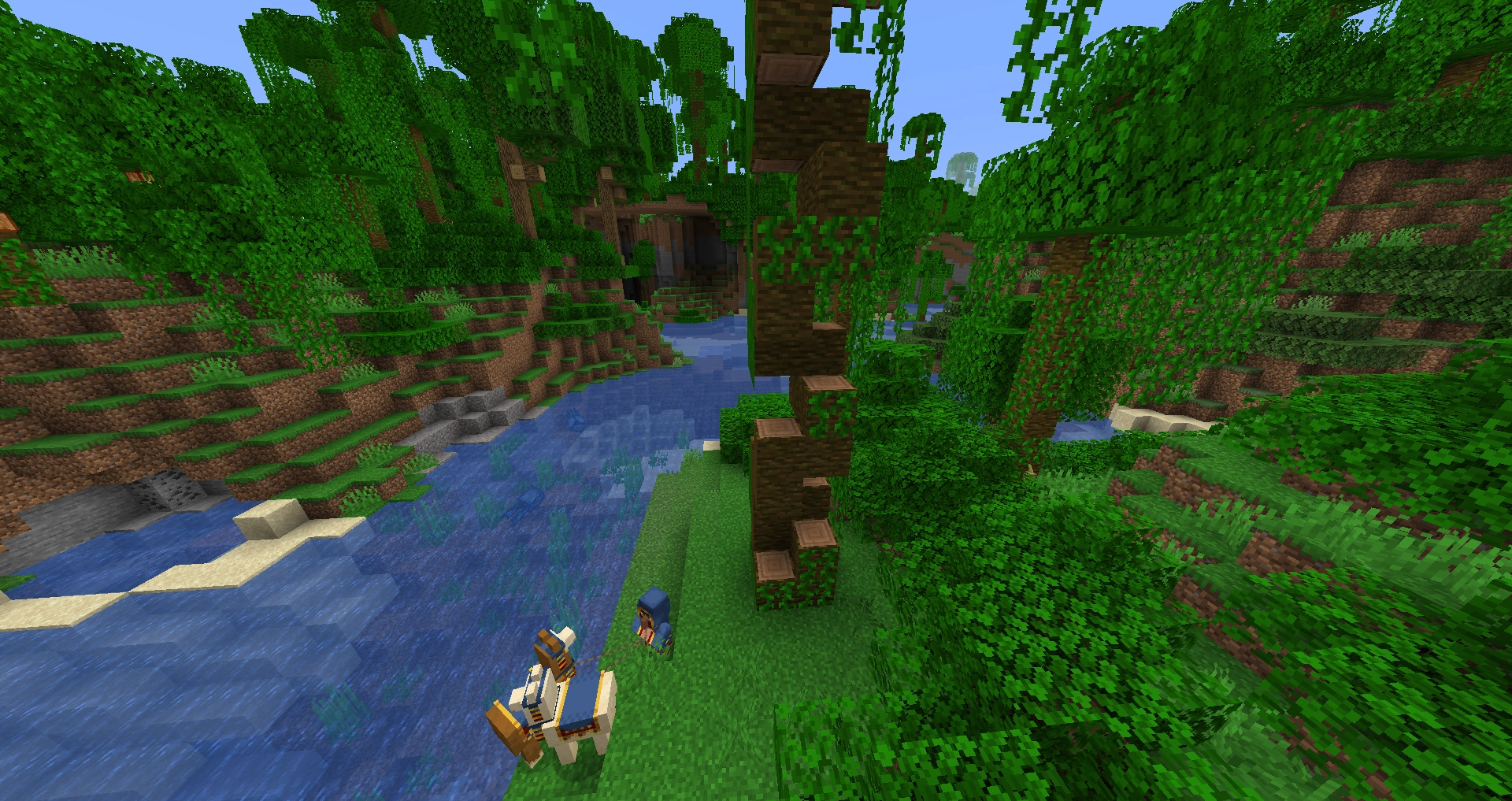

Jungle tree harvest. The villager up the tree should chop the block above him, then two blocks in front.
- You can harvest the '2x2' trees, such as giant jungle trees from the bottom by chopping them in a spiral. Chop out two blocks vertically, then jump into this space and chop out one block above you. Then chop out the two blocks in front of you which are 1m and 2m higher than your present height, forming a new space for you to jump into. Repeating this process in a spiral allows you to reach the top of the tree without using ladders or building giant ugly columns.
Mods
- Depending on how you play the game, some Minecraft mods may be ideal for speeding up your work. Tools such as MCEdit, mods such as BuildCraft or Plugins Such as Worldedit provide a wide variety of ways to speed up certain types of routine operation. Not all these mods fit with every playing style, but if you do want to be able to clone buildings, level vast areas, strip-mine to bedrock, and so on, it may well be worth investigating these tools rather than trying to do the work manually.
- To improve the game's performance, you may want to consider mods such as Optifine, FastCraft, BetterFPS, or the like. Sodium, Lithium and Phosphor, when used all together can boost fps higher than the previously stated mods. It should be noted, however that they require the fabric loader to function.
- VeinMiner can save a lot of time spent looking for ores by allowing you to mine out all blocks of a single type in a preset radius. However, mining in too large of a radius (>1000 blocks) drains hunger and tool durability very quickly and is therefore well used with a tool mod like Tinker's Construct.
- For 1.10 players, the Tiny Progressions mod allows for automatic cobblestone creation that costs very few resources and is even better with hoppers as the cobblestone Generator Blocks have very little inventory. You can also place a chest or other storage inventory above the generator and it will automatically dump the cobblestone into it.
- To save redstone work in multiplayer, use mods such as Securitycraft and Sticky Redstone.
- Many mods add tools or abilities that allow you to harvest entire trees at once.
- The infamous Inventory Tweaks mod allows highly configurable auto-sorting of player inventories, chests, and so on, and some tricks to, for example, shift-click one block at a time or automatically replace a tool when it breaks.
Out-of-Game Tips
External Tools
There are many external tools which may help speed up certain types of projects. There are graphics tools to help you make blueprints (such as GIMP, AutoCAD or Google Sketchup), and shape libraries and examples, YouTube videos and more besides. For any big project, look seriously at these options. Tips and examples by other people may save you hours of experimentation or wasted work, and they may help with artistic inspiration too. Pencil and graph paper are perfectly fine tools to use too, and for some projects they are likely to be the ideal solution.
Planning
If the player is doing anything big or complicated, planning ahead can give enormous benefits. The plan can be as simple as a quick mental checklist, or as ambitious as a full-blown blueprint plus materials requirements. You might also hop into creative mode to test out a section of a build (use a new world if you don't want to turn on cheats). Don't over-plan for a simple project, but don't underestimate the benefits of planning properly for an ambitious one.
User Interface Tips
Exploiting the Crafting Grid
- Some crafting recipes can be made more efficiently depending on how you place the items in the grid. This may only save a second or two when making the item, but for frequently-made objects this can still add up. For example, making a gate requires one log block. The most efficient way to make it is as follows:
- Place one log block anywhere in the grid, and it will form four planks.
- Hold left-click with the planks in the center of the grid and drag them up one slot to distribute them evenly between the two slots. The crafting output will switch from planks to sticks.
- Click once on the sticks, giving four sticks, and leaving two planks behind in the main grid.
- Using the method described in step 2, distribute the sticks evenly so that there is one on either side of each of the two planks already in the grid to form the gate.
By placing the planks in the middle of the grid in step 2, they are already in the right place to generate sticks and form the center part of the gate in step 4, which saves you from having to move them. Not many crafting recipes behave in this way, but whenever you make a lot of an item, if you are able to place the ingredients in just the right way you can save a little bit of time every time you craft it.
- Another example for time-saving in crafting is found at the very beginning of the game: Making a crafting table and sticks for tools.
- Take the wooden planks that were converted from logs. Place four in the crafting grid, but don't pick up the crafting table yet.
- Put four more planks in the crafting grid, but this time two on top of each other, for the stick recipes.
- This should give you a crafting table and then 8 sticks.
- Similarly, some recipes can be overlapped, so that you can make two different items at once with two quick clicks. You can overlay a shovel (and/or hoe) recipe over that for a pickaxe or axe: stack the extra sticks in place, and add an extra block or ingot at top center (and for a hoe, top-side). When making armor, boots or helmet can likewise be overlaid over pants or chestplate (and/or over each other).
| Name | Ingredients | Crafting recipe | Description |
|---|---|---|---|
| Pickaxe + Shovel + Hoe |
Cobblestone + Stick |
By adjusting this recipe you can make a Pickaxe followed by a Hoe, or Pickaxe, Hoe, Shovel. | |
| Stone Axe + Stone Hoe + Stone Shovel |
Cobblestone + Stick |
This recipe demonstrates making three tools in one go. | |
| Helmet + Boots + Leggings |
Iron Ingot | This recipe demonstrates making three parts of armor in one go. | |
| Helmet + Boots + Chestplate + Minecart |
Iron Ingot | 3 armor and 1 item in one go (crafting as-is will create an iron helmet, iron boots, iron chestplate and minecart.) |
Right-clicking
Right-clicking with the mouse selects half a stack at a time, or can be used to place a single item in a crafting or smelting slot. Using right-clicks wherever possible helps speed up many crafting recipes from steps and slabs to snowballs, because you can split the stacks into roughly equal portions and convert, for example, a stack of 16 snowballs into four snow blocks with just six clicks. Because crafting is such a big part of the game, making good use of the right-click facility is a big time-saver. Right-clicking on an odd stack gives the higher half, but if you want the lower half, right-click again.
Shapeless Recipes
For a few crafting recipes – such as mushroom stew and item repairs – the way you place the items in the crafting grid doesn't matter. Knowing these recipes saves a little time every time you make them because you know you don't have to place the items just so.
Shift-clicking
- Shift-clicking makes or moves as many of a stack of an item as possible. Making good use of this trick is probably the biggest time-saver the crafting, brewing, and smelting interfaces provide. It's also useful for quickly filling and emptying chests of stacks of items.
- Double-clicking while holding an item in your hand and holding down shift will move every stack of the item you clicked on, except for the item you are holding in your hand.
Double-clicking
Double-clicking an item attempts to pick up a full stack of it from the area you double-clicked in, then from other areas if it does not fill the stack. For example, if you double-click on a cobblestone block in your hot bar, it will pull as many as possible from your hotbar, then move on to your inventory, if the stack is not full yet. This is most useful for re-stacking buckets after you have emptied them of water or lava. Just double-click an empty bucket and you will grab 16 of them at once. You can then put the stack back in the hotbar, then double-click one in your inventory.
Dropping Items
Dropping items from your hotbar while holding down the control key will drop the full stack. This also works while in your inventory; hovering your mouse over an item in your inventory and pressing ctrl+q will drop the whole stack.
Video Settings
- Lag may arise from a variety of causes, depending on your computer. Possibilities include having too many mobs or items in one place, complex redstone circuits, large forest fires and so on. If the game is normally fast enough for you, but occasionally suffers from lag, don't forget the option of temporarily reducing the game's video settings. Change the render distance to 'Tiny', set particle effects to 'Minimal' and turn off any other video settings that you can live without. When the problem causing lag has cleared, go back to your normal settings. You can also press F3 + A to reset the chunks. This can help reset the lag.
Note: If the lag is network-related rather than a local problem, these changes won't help very much.
- If the game is always a bit sluggish on your system, you should use lower-quality video settings most of the time, but don't forget you can temporarily set the quality to high levels for short periods when you want to admire something. (If the lag gets very bad when you do this, setting the game to peaceful mode at the same time may also be prudent.)