




View at: Template:Environment/content [edit]
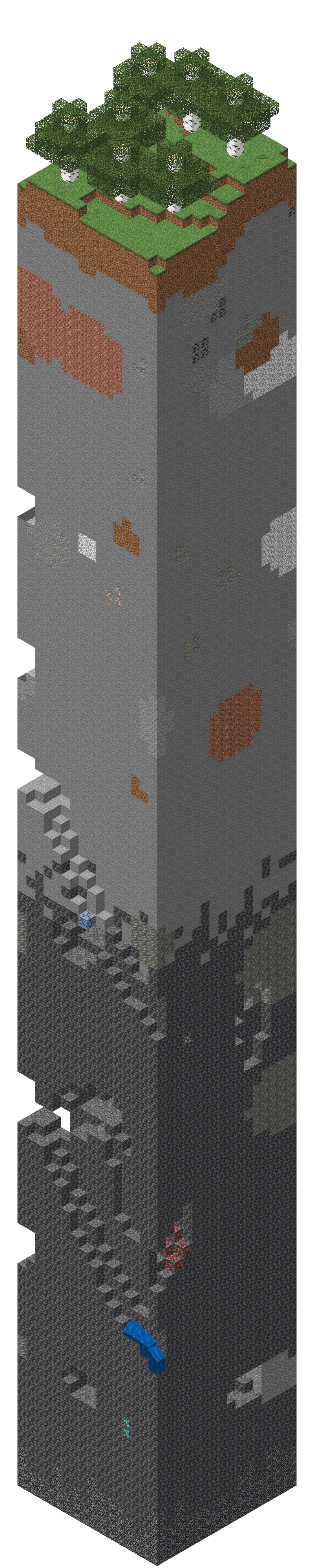
Visualization of the ground portion of a single chunk. The entire chunk extends up to a height of 320.
A chunk is a 16×16 portion of a world. Chunks are the method used by the game to divide maps into manageable pieces. They are divided in 16-block tall sections.
Description
Chunks are 16 blocks wide, 16 blocks long. They extend from the bottom void of the world, all the way up to the top sky. In vanilla overworld, their building height are 384 blocks, and they have 98,304 blocks total. In vanilla nether and the end, building heights are 256 blocks.
Chunks generate around players when they first enter the world. The generating and loading progress are displayed on the loading world screen[Java Edition only]. As they wander around the world, new chunks generate as needed.
Chunks generate with the help of the map seed, which means that the chunks are always the same if you would use the same seed again, as long as the map generator and version number remain the same.
in Java Edition, spawn chunks, a 19x19 set of chunks around the world spawn, are always loaded, so you can use that to your advantage when making automatic farms.
Chunk loading
Since Minecraft worlds are 30 million blocks in each cardinal direction and contain an extreme number of chunks, the game loads only certain chunks in order to make the game playable. Unloaded chunks are unprocessed by the game and do not process any of the game aspects.
Java Edition chunk loading
Tickets
Loading starts when a chunk receives ticket. All loaded chunks originate from the ticket. Each load ticket has three properties: Level, Ticket type and (optional) Time to Live.
Level and load type
Levels are numbers that determine what load type the chunk is in. A lower level represents higher a load type. For a given chunk, it may get different level from different tickets, but only its lowest level matters.
Load levels range from 22 to 44 in regular gameplay, while only 22 to 33 are relevant to chunk loading. Load levels less than 22 are valid but possible only with a modded game. Load levels above 44 are instantly unloaded in vanilla.
There are four chunk load types; each load type has different properties. This excludes unloaded chunks.
| Load Type | Level | Properties | |
|---|---|---|---|
| Entity Ticking | 31 and below | All game aspects are available. | |
| Block Ticking | 32 | All game aspects are available except that entities are not naturally spawned and not processed (but are still accessible) and chunk ticks aren't either. | |
| Border | 33 | No game aspects are available, but entities and blocks are still accessible (can be detected or modified). | |
| Inaccessible | 34 and above | No game aspects are available nor accessible, but world generation occurs here. | |
Level propagation
Load levels "propagate" or flow from source chunk with a ticket to neighboring chunks, but each time it increases its level by 1 until the maximum of 44.
The chunks that get load level from level propagation activate the assigned load type.
| 34 | 34 | 34 | 34 | 34 | 34 | 34 |
| 34 | 33 | 33 | 33 | 33 | 33 | 34 |
| 34 | 33 | 32 | 32 | 32 | 33 | 34 |
| 34 | 33 | 32 | 31 | 32 | 33 | 34 |
| 34 | 33 | 32 | 32 | 32 | 33 | 34 |
| 34 | 33 | 33 | 33 | 33 | 33 | 34 |
| 34 | 34 | 34 | 34 | 34 | 34 | 34 |
| IN | IN | IN | IN | IN | IN | IN |
| IN | BO | BO | BO | BO | BO | IN |
| IN | BO | BT | BT | BT | BO | IN |
| IN | BO | BT | ET | BT | BO | IN |
| IN | BO | BT | BT | BT | BO | IN |
| IN | BO | BO | BO | BO | BO | IN |
| IN | IN | IN | IN | IN | IN | IN |
Ticket types
There are different ticket types, which come from various sources.
- Player ticket
This ticket is caused by the player and is assigned level 31. A player ticket is given to each chunk within a square region surrounding the chunk where the player is located, as defined by the formulas described below, and propagates as described in the table above.
In singleplayer, "Render Distance" in options decides the side length of the square. It follows the formula , where r is the selected render distance, and l is the side length (in chunks) of the square.
In multiplayer, "view-distance" configured in server.properties decides the side length of the square. It also follows the same formula where r is the configured "view-distance" and l is the side length of the square region.
For example, in a single-player game with a "Render Distance" of 5 chunks, a region of 11 × 11 chunks centered around the player has a load type of entity ticking (level 31). The strip of chunks at the outer edge of a 13 × 13 perimeter surrounding the player have block ticking (level 32), and the next enclosing chunks (15 × 15 perimeter) are border chunks (level 33).
- Forced ticket
A ticket can also be created by using the /forceload command. It has a level of 31, so its propagation can be seen in the table above.
Chunks remain force-loaded even after exiting and re-entering the level.
- Start ticket
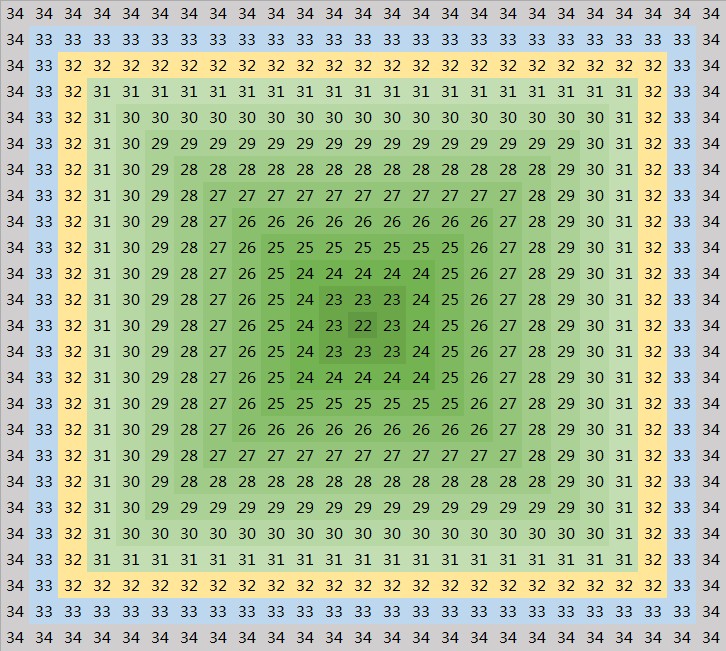
Propagation of start ticket
Ticket created by the world spawn for the chunk it is located at, loading a 23 by 23 chunk area known as the "spawn chunks". Its position can be changed by a /setworldspawn command. It has a level of 22, the lowest in the game.
- Portal ticket
Ticket created when an entity is teleported through a nether portal, given to the chunk at the other side of the portal. It has a level of 30, so it is stronger than the player/force loaded ticket.
It expires after 300 game ticks (equivalent to 15 seconds). Because they are created each time an entity passes through the portal, it is possible to create a "chunk loader". Perpetually keeping chunks loaded without the player being near, which can be used for various in-game mechanics such as farms, but can create lag.
- Dragon ticket
Ticket created at the start of the battle with the ender dragon and is given to the 0,0 chunk. It has a level of 24.
It expires if there are no players within a Euclidean distance of 192 blocks from (0.0, 128, 0.0), or the dragon dies.
- Post-teleport ticket
Ticket created when entity is teleported either by going through the end portal or using /teleport or /spreadplayers commands. The /spreadplayers and /teleport command has a level of 32, whereas, for the end portal, it has a level of 33.
It expires after 5 game ticks.
- Unknown ticket
When the game needs to immediately use the data of a chunk, but the chunk has not yet been created or generated to required step, the game automatically gives a ticket named "unknown" to the chunk. It expires after 1 game tick (0.05 seconds). The load level depends on the step to which the game needs the chunk to generate, and it is always greater than 32. It is in various game calculations, such as mob AI, mob spawning, etc.
For example, when a generic mob wandering AI is executing, it asks if a certain block has a solid top surface. As part of that check, that chunk has an "unknown" ticket with level 33 placed on it. Similarly, commands such as /clone, /data, /execute (if|unless) (block|blocks|predicate), /fill and /setblock generate an unknown ticket when reading data from or writing it to a previously loaded chunk; if run every tick, they can prevent the chunk from unloading until the world is reloaded.[1]
- Light ticket
The light ticket is only used for world generation, and has a level of 33. A chunk gets a light ticket when starting the light step of chunk generation, to ensure that it is accessible to calculate light. After the light calculation is completed, this ticket is removed.
Limitations
Ticking
Though respective game aspects are available if a chunk loaded to a certain level, whether these game aspects are processed depends not only on chunk loading. It is also subject to some other restrictions.
Chunk loading caused by a player ticket allows entities to be ticked only if the chunk is in a square around the chunk which has the player ticket, as defined by the formulas described below. Entity despawning is not affected by this.
In singleplayer, "Simulation Distance" in options decides the side length of the square. It follows the formula , where s is the selected simulation distance, and l is the side length (in chunks) of the square.
In multiplayer, "simulation-distance" configured in server.properties decides the side length of the square. It also follows the same formula where s is the configured "simulation-distance" and l is the side length of the square region.
Chunk loading caused by a player ticket allows block entities to be ticked and scheduled tick and chunk tick (without mob spawning) to be processed only if the chunk is in the aforementioned square region along with a one-chunk-thick square frame surrounding this region. That is, a square region with side length of .
For example,
- With a simulation distance of 5 and a render distance of 10, entities move normally within a 11×11 chunk column around the player chunk. One more chunk out, within a one-chunk-thick square frame surrounding this region, redstone and command blocks still run, fluids flow, and crops grow. Zombies stop despawn naturally beyond 21×21 chunks.
- With a simulation distance of 5 and a render distance of 5, entities move normally within a 11×11 chunk column around the player chunk. One more chunk out, within a one-chunk-thick square frame surrounding this region, redstone and command blocks still run and fluids still flow, but crops stop grow. Zombies won't despawn because they are unloaded before being 128 blocks away from the player.
- With a simulation distance of 5 and a render distance of 2, entities move normally within a 5×5 chunk column around the player chunk. One more chunk out, within a one-chunk-thick square frame surrounding this region, redstone and command blocks still run and fluids still flow, but crops stop grow. Zombies won't despawn.
Technically, the above game aspects are controlled by another different ticket system named ticking ticket.
Idle timeout
Each dimension has its own idle timeout. It increases 1 every game tick. If there are players or forceloaded chunks in the dimension, the timeout is reset to 0 and disabled. When entity leaves or enters this dimension, the timeout is reset to 0.
If the timeout reaches 300 game ticks, the dimension stops processing certain actions. These include entity and block entity ticking, ender dragon fight, and global entities (lightning).
Others
Some game aspects don't always get processed in loading chunks because there may be other conditions for their progress, which includes the following:
- Chunk tick (including mob spawning)
- Only chunks with centers within 128 blocks of a player are ticked on every game tick. See also Tick.
- Entities
- Hostile mobs instantly despawn if they spawn more than 128 blocks from all players.
- This includes zombified piglins at Nether portals and witches in witch huts.
- Passive mobs do not spawn naturally outside a 240 block X 240 block area around a player.
- The passive mob spawn cap is limited by the number of friendly mobs loaded into memory, which means that any passive mobs present in the spawn chunks count toward the mob cap and usually prevents friendly mobs from naturally spawning anywhere else in the world. The only exception is when passive mobs spawn as part of a newly generated chunk.
- See also Spawn.
- Hostile mobs instantly despawn if they spawn more than 128 blocks from all players.
Expections
Events in a chunk may affect blocks in outside chunks. If the outside chunk is inactive, the effects are suspended in most cases. Specifically,
- Block changing on the edge of a block ticking chunk can spread updates to blocks outside the block ticking chunk and make them respond appropriately. The update may be propagated block by block until outside the border chunks, at which time it creates an unknown ticket to continue propagation.
- Block in a chunk with a 33 level can request a scheduled tick, but it does not get processed until the chunk gets a load level of 32 or below.
- Flowing water or lava can spread to the first adjacent block outside a block ticking chunk, but the flow becomes suspended there until the border chunk has a greater load level.
- Fire can spread to the first adjacent flammable block outside the block ticking chunk. Like water and lava, it becomes suspended there. It cannot spread further until the outside chunk gets a level of 32 or below.
- Grass and mycelium can spread to the first adjacent block outside an entity ticking chunk.
- Pumpkin and melon stem growing on the edge of an entity ticking chunk can place their fruits on an adjacent block outside the entity ticking chunk.
- An entity (mob, minecart, arrow, etc.) that attempts to move into a block ticking chunk from an entity ticking chunk becomes suspended as soon as it leaves the entity ticking chunk. When the block ticking chunk gets a greater level, the entity resumes moving.
- Exploding TNT in entity ticking chunks can damage or destroy blocks in a non-entity-ticking chunk.
Bedrock Edition chunk loading
Main article: Ticking area
All game aspects are active in loading chunks, including chunks within a player's simulation distance and chunks loaded by Commands/tickingarea. Unloaded chunks are unprocessed by the game and do not process any of the game aspects.
Type
- Player
- A round-like shape[more information needed].
- Chunks within the simulation distance of a player are loading.
- Command
- Create with the
/tickingareacommand.
Limit
- Entities
- Mob spawning is evaluated for every chunk within a 6 chunk cylindrical radius of the player that is loaded.
Exception
Events in a ticking area may affect blocks in outside chunks. If the outside chunk is inactive, the effects are suspended in most cases. Specifically,
- Block changing on the edge of a ticking area can spread updates to blocks outside the ticking area and respond appropriately.
- Flowing water or lava can spread to the first adjacent block in an outside chunk, but the flow becomes suspended there until the outside chunk becomes active.
- Fire can spread to the first adjacent flammable block outside the ticking area. Like water and lava, it becomes suspended there; although visible, its animation does not run, and it cannot spread further until the outside chunk becomes active.
- Grass and mycelium can spread to the first adjacent block in an outside chunk, but the affected block does not actually change its appearance until its chunk becomes active; it then changes instantly. Grass and mycelium cannot spread beyond the first such block, nor from such a block into the ticking area until the outside chunk becomes active.
- Pumpkin and melon stem growing on the edge of a ticking area can place their fruits on an adjacent block in an outside chunk.
- An entity (mob, minecart, arrow, etc.) that attempts to move into an outside chunk becomes suspended as soon as it leaves the ticking area. It remains visible but motionless. When the outside block becomes active, the entity resumes moving.
- Exploding TNT can damage or destroy blocks in an inactive chunk, and unlike other events, its effects are not limited to adjacent blocks. However, secondary effects in the outside chunk are suspended until the chunk becomes active. For instance, if an explosion destroys a block that supported sand or gravel, the sand or gravel does not fall immediately. The same thing happens with items that were attached to destroyed blocks, such as item frames and Redstone torches; they do not drop until the chunk is activated.
- Primed TNT launched into an inactive chunk is suspended in mid-air within the first outside block it enters. It disappears until the outer chunk becomes active, at which time it resumes its flight and countdown.
Finding chunk edges
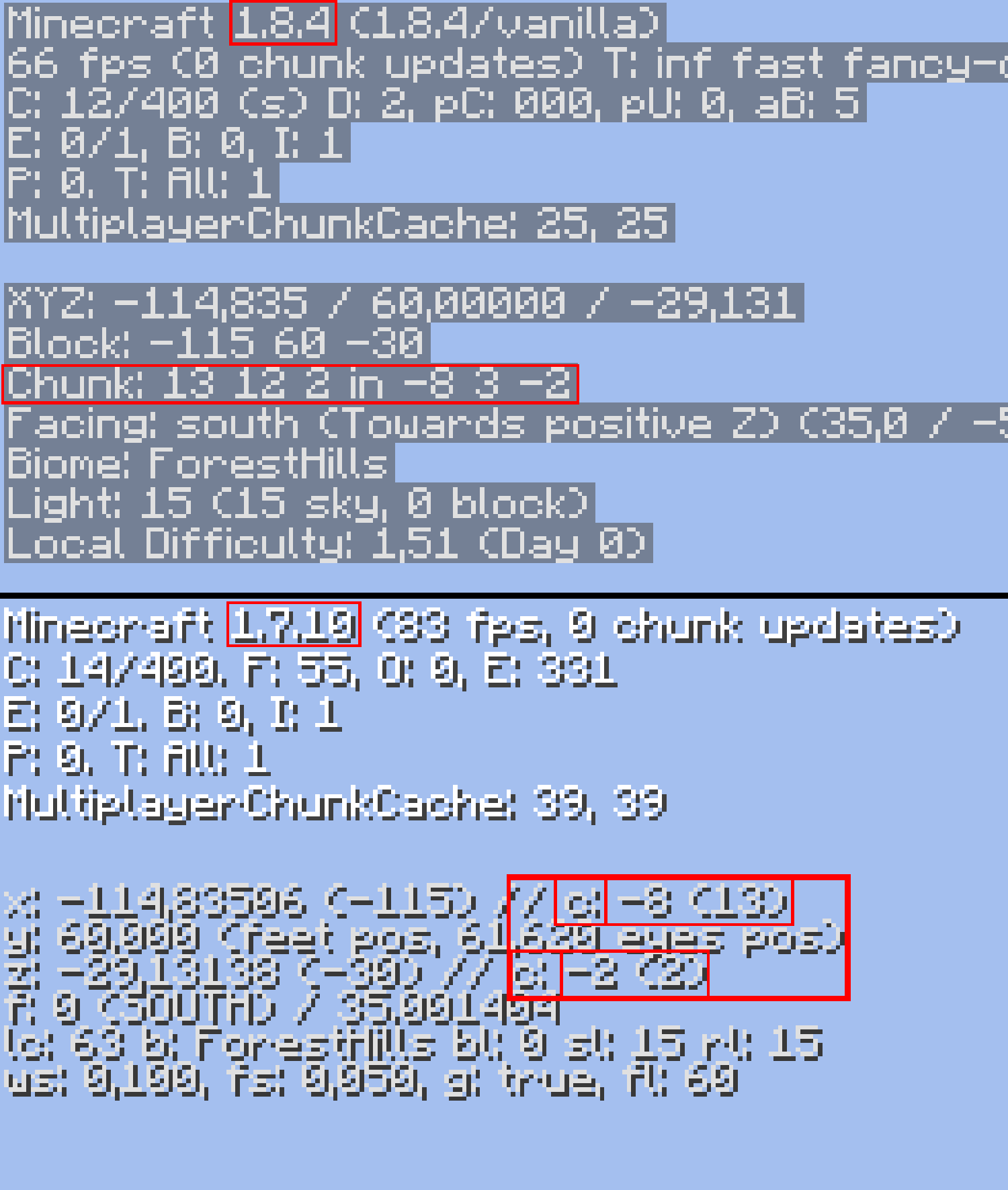
X and Z coordinates that are divisible by 16 represent the boundaries between chunks. EG: (96, -32) is a corner where four chunks meet. One of those chunks is between X coordinates 80 to 96 and Z coordinates -48 to -32. Another one is between X coordinates 96 to 112 and Z coordinates -32 to -16, and so on. When either X or Z crosses a multiple of 16, the player is moving across chunks.
Essentially, the player is in the top-left corner (north-western) of a chunk when both X and Z coordinates are divisible by 16.
Additionally, the player can know the chunk they are on by this formula:
The X of a chunk is floor(X coordinate / 16)
The Z of a chunk is floor(Z coordinate / 16)
Where floor is the largest previous integer. E.g. Floor( 27.9561 ) is 27
In other words, if X was 27, Z was −15 the chunk is chunk (Floor(27/16), Floor(−15/16)), meaning that the player is on chunk (1, −1).
Also, the coordinates of a block within a chunk can be found by taking the coordinate mod 16.
In Java Edition, the key F3 + G can be used to display chunk boundaries. Alternately, pressing the "F3" button opens the Debug screen that shows the player's X, Y, and Z coordinates, in addition to the "chunk" variable. These coordinates change as the player moves around. The player can know the chunk they are in by the variable "chunk".
In Bedrock Edition, when toggling fancy graphics, the world renders again, loading only the chunk the player is in for a split second, briefly showing the chunk boundaries. When the player changes the render distance rapidly, chunk barriers appear as a blue line. Also, if in mid-air and bridging with full blocks, the next block placed fades into view when a chunk border is intersected, showing the chunk border. This is sometimes unreliable, and it happens only on chunk borders. This does not happen underground or when the block placed is close to more than one block.
Slime chunks
Main article: Slime § Spawning
Slime chunks are specific chunks capable of spawning slimes below Y=40 regardless of Light. These chunks are otherwise same as all other chunks.
Java Edition
Slime chunks generate throughout the world (except in mushroom islands). 1 chunk in 10 is a slime chunk. These slime chunks are determined pseudo-randomly by combining their chunk coordinates with the seed of the world:
Random rnd = new Random(
    seed +
    (int) (xPosition * xPosition * 0x4c1906) +
    (int) (xPosition * 0x5ac0db) +
    (int) (zPosition * zPosition) * 0x4307a7L +
    (int) (zPosition * 0x5f24f) ^ 0x3ad8025f
);
return rnd.nextInt(10) == 0;
That is, using the chunk coordinates to help generate a seed, a random number between 0 and 9 inclusive is generated, and if that number is 0, the chunk can spawn slimes. To convert world coordinates to chunk coordinates, divide by 16 and round down. Note that xPosition, and zPosition are 32-bit integers (ints).
Bedrock Edition
The slime chunk algorithm in Bedrock Edition is different from in Java Edition. The algorithm doesn't depend on the world seed, thus the chunks that slimes can naturally spawn in are the same for every world.[2]
History
| Java Edition pre-Classic | |||||
|---|---|---|---|---|---|
| rd-131655 | The precursors to chunks are showcased. | ||||
| Java Edition Infdev | |||||
| 20100227-1 | Map height is not custom anymore. The chunk height has been changed to 128. | ||||
| Java Edition | |||||
| 1.2.1 | 12w07a | The chunk height has been increased to 256, as part of the transition from Region to Anvil file format. | |||
| 1.4.2 | 12w39a | The debug screen now shows the coordinates of the chunk the player is in, and the player's coordinates in that chunk. | |||
| 1.10 | 16w20a | F3 + G now toggles the visible chunk borders around the player. | |||
| 1.14 | ? | The method of chunk loading has changed. | |||
| 1.17 | 20w49a | Map height is now custom again. | |||
| 21w06a | Maximum buiding height in overworld has been increased to 320 and minimum height has been dropped to -64, making chunks 384 blocks high in total. | ||||
| 21w15a | The chunk height changes have been reverted. | ||||
| 1.18 | Experimental Snapshot 1 | Chunks in overworld are again 384 blocks high. | |||
| 21w37a | Render distance now causes chunks to load in a cylinder shape around the player instead of a square. | ||||
| 21w38a | Added simulation distance, which affects entity ticking. | ||||
| Upcoming Java Edition | |||||
| 1.21.11 | 25w44a | Chunks now fade into view when loading up. This fading animation is vaguely similar to Bedrock Edition. | |||
Trivia
- If a player stands in a chunk that has not generated yet, the world immediately becomes invisible until they are in a valid chunk. This does not happen if the Y coordinates are beyond the chunk boundaries.
- In Bedrock Edition, if one of the sixteen 16×16×16 sections of a chunk doesn't have any blocks in it, placing a block there shows the same animation as a chunk loading. This bug makes the block that the player placed to turn to the same color of the sky in the direction the player is facing for about 1 second and starts fading away into the normal block texture. If the time is sunrise or sunset and the player places a block there, it actually changes colors constantly for 1 second if the player keeps bobbing their head up and down. The block also makes blocks behind it appear invisible.
See also
References
- ↑ MC-168596
- ↑ The reverse-engineered Bedrock Edition slime chunk algorithm can be found on GitHub at depressed-pho/slime-finder-pe.